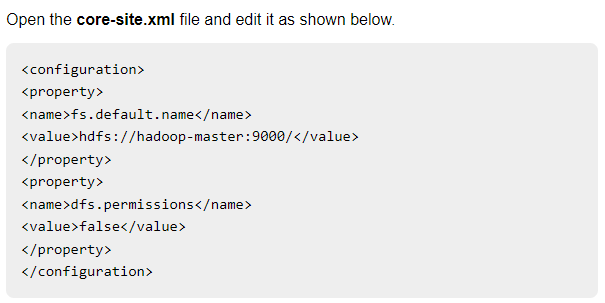
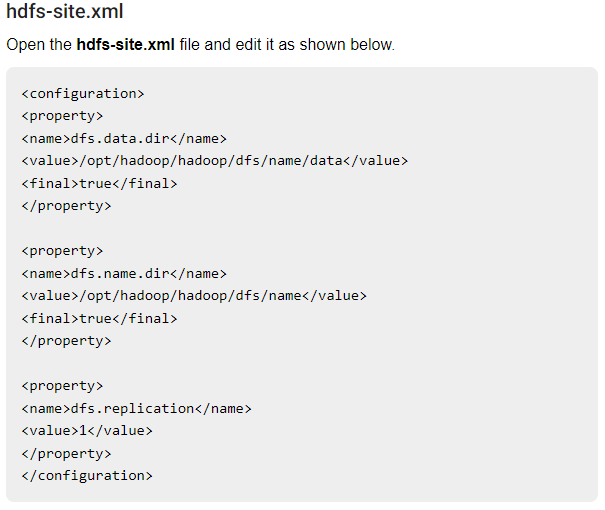
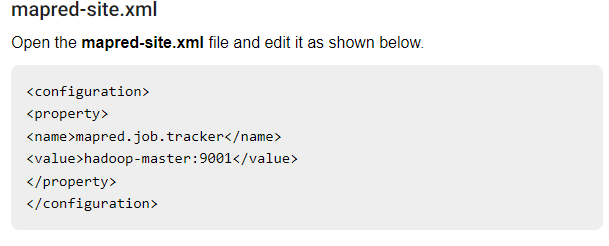
<?xml version="1.0" encoding="utf-8"?>
<feed xmlns="http://www.w3.org/2005/Atom">
  <link
    href="https://hattajr.github.io/feed.xml"
    rel="self"
    type="application/atom+xml"
  />
  <link href="https://hattajr.github.io" rel="alternate" type="text/html" />
  <updated>2026-06-09T15:13:06.438Z</updated>
  <id>https://hattajr.github.io/feed.xml</id>
  <title type="html">hattajr</title>
  <subtitle>hattajr&#039;s Arts&amp;Crafts</subtitle>
  <author><name>Muhammad Hatta</name></author>
  <entry>
    <title type="text">Create XFS Disk Partition in Linux</title>
    <link
      href="https://hattajr.github.io/2024/07/02/create-xfs-disk-partition-linux.html"
      rel="alternate"
      type="text/html"
      title="Create XFS Disk Partition in Linux"
    />
    <published>2024-07-02T00:00:00+00:00</published>
    <updated>2024-07-02T00:00:00+00:00</updated>
    <id>https://hattajr.github.io/2024/07/02/create-xfs-disk-partition-linux</id>
    <author><name>Muhammad Hatta</name></author>
    <summary type="html">
      <![CDATA[Check disk drive and get the name /dev/sdX]]>
    </summary>
    <content
      type="html"
      xml:base="https://hattajr.github.io/2024/07/02/create-xfs-disk-partition-linux.html"
    >
      <![CDATA[
<header>
  <h1>Create XFS Disk Partition in Linux</h1>
  <time class="meta" datetime="2024-07-02">Jul 2, 2024</time>
</header>
<ol>
<li>
<p>Check disk drive and get the name ‘/dev/sdX’</p>

<figure class="code-block">


<pre><code><span class="line">sudo fdisk -l</span></code></pre>

</figure>
</li>
<li>
<p>Create n number of partitions</p>

<figure class="code-block">


<pre><code><span class="line">sudo fdisk /dev/sdX</span>
<span class="line"><span class="hl-comment"># n, p, default, default, +size</span></span>
<span class="line"><span class="hl-comment"># do it n times</span></span></code></pre>

</figure>
</li>
<li>
<p>Set all partions to xfs format</p>

<figure class="code-block">


<pre><code><span class="line"><span class="hl-keyword">for</span> i <span class="hl-keyword">in</span> {1...n}; <span class="hl-keyword">do</span> sudo mkfs.xfs /dev/sdX<span class="hl-variable">$i</span>; <span class="hl-keyword">done</span></span></code></pre>

</figure>
</li>
<li>
<p>Mount all the partitions</p>

<figure class="code-block">


<pre><code><span class="line">sudo <span class="hl-built_in">mkdir</span> -p /mnt/minio/disk</span></code></pre>

</figure>
</li>
<li>
<p>For persitance when reboot, copy all the text below to <code>/etc/fstab</code></p>

<figure class="code-block">


<pre><code><span class="line">/dev/sdX1 /mnt/minio/disk1 xfs defaults 0 0</span>
<span class="line">/dev/sdX2 /mnt/minio/disk2 xfs defaults 0 0</span>
<span class="line">/dev/sdX3 /mnt/minio/disk3 xfs defaults 0 0</span>
<span class="line">/dev/sdX4 /mnt/minio/disk4 xfs defaults 0 0</span></code></pre>

</figure>
</li>
<li>
<p>Validate the partition</p>

<figure class="code-block">


<pre><code><span class="line"><span class="hl-built_in">df</span> -h</span></code></pre>

</figure>
</li>
</ol>
]]>
    </content>
  </entry>
  <entry>
    <title type="text">Apache Superset Query Data From Deltalake</title>
    <link
      href="https://hattajr.github.io/2023/09/20/superset-deltalake.html"
      rel="alternate"
      type="text/html"
      title="Apache Superset Query Data From Deltalake"
    />
    <published>2023-09-20T00:00:00+00:00</published>
    <updated>2023-09-20T00:00:00+00:00</updated>
    <id>https://hattajr.github.io/2023/09/20/superset-deltalake</id>
    <author><name>Muhammad Hatta</name></author>
    <summary type="html"><![CDATA[Install minio client using pip.]]></summary>
    <content
      type="html"
      xml:base="https://hattajr.github.io/2023/09/20/superset-deltalake.html"
    >
      <![CDATA[
<header>
  <h1>Apache Superset Query Data From Deltalake</h1>
  <time class="meta" datetime="2023-09-20">Sep 20, 2023</time>
</header>
<ol>
<li>
<p>Install minio client using pip.</p>
</li>
<li>
<p>Setup custom config at <code>superset/docker/pythonpath_dev/superset_config.py</code></p>

<figure class="code-block">


<pre><code><span class="line"><span class="hl-keyword">def</span> <span class="hl-title function_">build_config</span>(<span class="hl-params">env_file=<span class="hl-string">&quot;.env&quot;</span></span>):</span>
<span class="line">    <span class="hl-keyword">from</span> dotenv <span class="hl-keyword">import</span> dotenv_values</span>
<span class="line"></span>
<span class="line">    config = dotenv_values(env_file)</span>
<span class="line">    <span class="hl-keyword">if</span> <span class="hl-built_in">any</span>(</span>
<span class="line">        [</span>
<span class="line">            config.get(<span class="hl-string">&quot;AWS_ACCESS_KEY_ID&quot;</span>) <span class="hl-keyword">is</span> <span class="hl-literal">None</span>,</span>
<span class="line">            config.get(<span class="hl-string">&quot;AWS_SECRET_ACCESS_KEY&quot;</span>) <span class="hl-keyword">is</span> <span class="hl-literal">None</span>,</span>
<span class="line">            config.get(<span class="hl-string">&quot;AWS_ENDPOINT_URL&quot;</span>) <span class="hl-keyword">is</span> <span class="hl-literal">None</span>,</span>
<span class="line">        ]</span>
<span class="line">    ):</span>
<span class="line">        <span class="hl-keyword">raise</span> ValueError(<span class="hl-string">&quot;AWS credentials not found in .env file&quot;</span>)</span>
<span class="line">    <span class="hl-keyword">return</span> config</span>
<span class="line"></span>
<span class="line"><span class="hl-keyword">def</span> <span class="hl-title function_">create_minio_client</span>(<span class="hl-params">env_file=<span class="hl-string">&quot;.env&quot;</span></span>):</span>
<span class="line">    <span class="hl-string">&quot;&quot;&quot;</span></span>
<span class="line"><span class="hl-string">    Creates a minio client using the credentials stored in the .env file.</span></span>
<span class="line"><span class="hl-string">    &quot;&quot;&quot;</span></span>
<span class="line">    <span class="hl-keyword">from</span> minio <span class="hl-keyword">import</span> Minio</span>
<span class="line"></span>
<span class="line">    config = build_config(env_file=env_file)</span>
<span class="line"></span>
<span class="line">    <span class="hl-comment"># remove http:// because Minio doesn&#x27;t like it</span></span>
<span class="line">    endpoint = config[<span class="hl-string">&quot;AWS_ENDPOINT_URL&quot;</span>].split(<span class="hl-string">&quot;//&quot;</span>)[<span class="hl-number">1</span>]</span>
<span class="line">    <span class="hl-keyword">return</span> Minio(</span>
<span class="line">        endpoint,</span>
<span class="line">        access_key=config[<span class="hl-string">&quot;AWS_ACCESS_KEY_ID&quot;</span>],</span>
<span class="line">        secret_key=config[<span class="hl-string">&quot;AWS_SECRET_ACCESS_KEY&quot;</span>],</span>
<span class="line">        secure=<span class="hl-literal">False</span>,</span>
<span class="line">    )</span>
<span class="line"></span>
<span class="line"><span class="hl-keyword">def</span> <span class="hl-title function_">create_minio_file_url</span>(<span class="hl-params">bucket_name, table_path</span>):</span>
<span class="line">    <span class="hl-keyword">from</span> datetime <span class="hl-keyword">import</span> timedelta</span>
<span class="line">    <span class="hl-keyword">from</span> deltalake <span class="hl-keyword">import</span> DeltaTable</span>
<span class="line"></span>
<span class="line">    storage_options = {</span>
<span class="line">        <span class="hl-string">&quot;AWS_ACCESS_KEY_ID&quot;</span>:</span>
<span class="line">        <span class="hl-string">&quot;AWS_SECRET_ACCESS_KEY&quot;</span>:</span>
<span class="line">        <span class="hl-string">&quot;AWS_ENDPOINT_URL&quot;</span>:</span>
<span class="line">        <span class="hl-string">&quot;AWS_REGION&quot;</span>:</span>
<span class="line">        <span class="hl-string">&quot;AWS_S3_ALLOW_UNSAFE_RENAME&quot;</span>: <span class="hl-string">&quot;true&quot;</span>,</span>
<span class="line">        <span class="hl-string">&quot;AWS_STORAGE_ALLOW_HTTP&quot;</span>: <span class="hl-string">&quot;true&quot;</span>,</span>
<span class="line">    }</span>
<span class="line">    dt = DeltaTable(table_path, storage_options=storage_options)</span>
<span class="line"></span>
<span class="line">    env_file = __file__.replace(<span class="hl-string">&quot;superset_config.py&quot;</span>, <span class="hl-string">&quot;.env&quot;</span>)</span>
<span class="line">    minioClient = create_minio_client(env_file=env_file)</span>
<span class="line"></span>
<span class="line">    file_urls = []</span>
<span class="line"></span>
<span class="line">    <span class="hl-comment"># Now you have a dictionary of object names and their respective download URLs</span></span>
<span class="line">    <span class="hl-keyword">for</span> url <span class="hl-keyword">in</span> dt.file_uris():</span>
<span class="line">        url = url.replace(<span class="hl-string">f&quot;s3://<span class="hl-subst">{bucket_name}</span>/&quot;</span>, <span class="hl-string">&quot;&quot;</span>)</span>
<span class="line">        file_urls.append(</span>
<span class="line">            minioClient.presigned_get_object(bucket_name, url, expires=timedelta(days=<span class="hl-number">1</span>))</span>
<span class="line">        )</span>
<span class="line">    <span class="hl-keyword">return</span> file_urls</span>
<span class="line"></span>
<span class="line">JINJA_CONTEXT_ADDONS = {<span class="hl-string">&quot;delta_table&quot;</span>: create_minio_file_url}</span></code></pre>

</figure>
</li>
<li>
<p>In Superset SQL-Lab.</p>

<figure class="code-block">


<pre><code><span class="line"><span class="hl-keyword">SELECT</span> test_id, test_actual_duration <span class="hl-keyword">from</span> read_parquet({{delta_table(<span class="hl-string">&#x27;spatch&#x27;</span>, <span class="hl-operator">&lt;</span><span class="hl-keyword">table</span><span class="hl-operator">-</span>path<span class="hl-operator">&gt;</span>)}}) LIMIT <span class="hl-number">7</span>;</span></code></pre>

</figure>
</li>
</ol>
]]>
    </content>
  </entry>
  <entry>
    <title type="text">Databricks Webinar - Deltalake</title>
    <link
      href="https://hattajr.github.io/2023/04/18/databricks-webinar.html"
      rel="alternate"
      type="text/html"
      title="Databricks Webinar - Deltalake"
    />
    <published>2023-04-18T00:00:00+00:00</published>
    <updated>2023-04-18T00:00:00+00:00</updated>
    <id>https://hattajr.github.io/2023/04/18/databricks-webinar</id>
    <author><name>Muhammad Hatta</name></author>
    <summary type="html"><![CDATA[try to embrace spark.sql(...)]]></summary>
    <content
      type="html"
      xml:base="https://hattajr.github.io/2023/04/18/databricks-webinar.html"
    >
      <![CDATA[
<header>
  <h1>Databricks Webinar - Deltalake</h1>
  <time class="meta" datetime="2023-04-18">Apr 18, 2023</time>
</header>
<section id="Day-1">

<h3><a href="#Day-1">Day 1</a></h3>
<ul>
<li>
try to embrace <code>spark.sql(...)</code>
</li>
</ul>
</section>
<section id="Day-2">

<h3><a href="#Day-2">Day 2</a></h3>
<ul>
<li>
<p>HIVE METASTORE (?)</p>
</li>
<li>
<p>deltalake managed and external table
- managed → if you dropped table, both parquet and table metadata is dropped
- external → only table metadata is dropped</p>
</li>
<li>
<p>Deltalake described table</p>

<figure class="code-block">


<pre><code><span class="line"> DESCRIBE DETAIL <span class="hl-string">&#x27;/data/events/&#x27;</span></span>
<span class="line"> </span>
<span class="line"> DESCRIBE DETAIL eventsTable</span>
<span class="line"> </span>
<span class="line"> DESCRIBE [SCHEMA] EXTENDED ${da.schema_name}_default_location;</span></code></pre>

</figure>
</li>
<li>
<p>Create table</p>
<p><code>CREATE SCHEMA IF NOT EXISTS ${da.schema_name}</code></p>
<p>what is the difference with <code>DeltaTable.createIfNotExists</code> ?</p>
</li>
<li>
<p>Define table schema while creating table is recommended</p>
</li>
<li>
<p>SQLite → a database that use local file system</p>
</li>
<li>
<p>Using <code>CREATE OR REPLACE TEMP VIEW {table_name} ({all_col_schema})</code> to read and infer schema before creating table or you can use <code>CREATE OR REPLACE TABLE sales_unparsed</code> (find out more about this and CTAS) [<a href="https://github.com/databricks-academy/data-engineering-with-databricks-english/blob/published/04%20-%20ETL%20with%20Spark%20SQL/DE%204.3%20-%20Creating%20Delta%20Tables.sql">link</a>]</p>
</li>
<li>
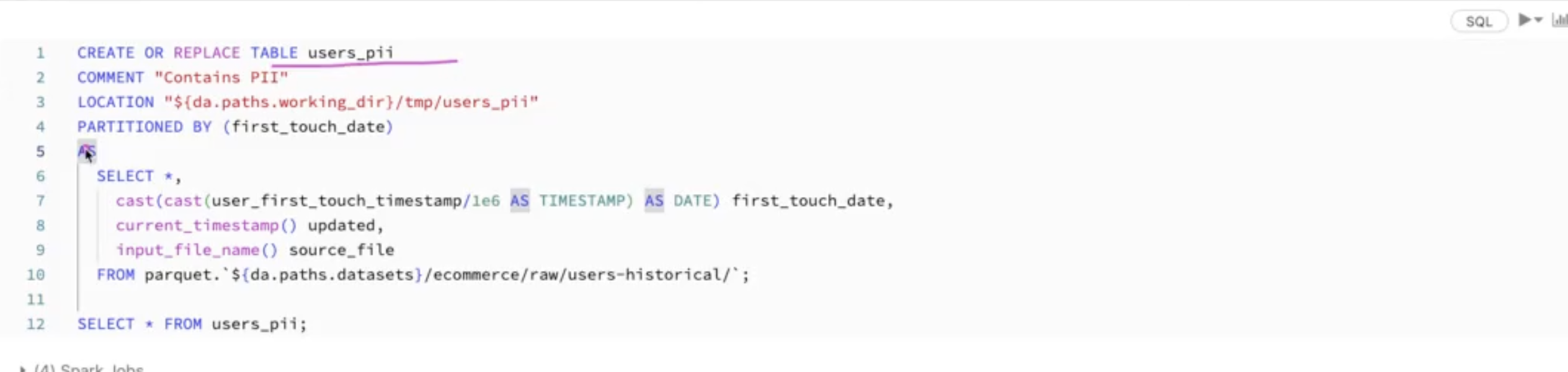
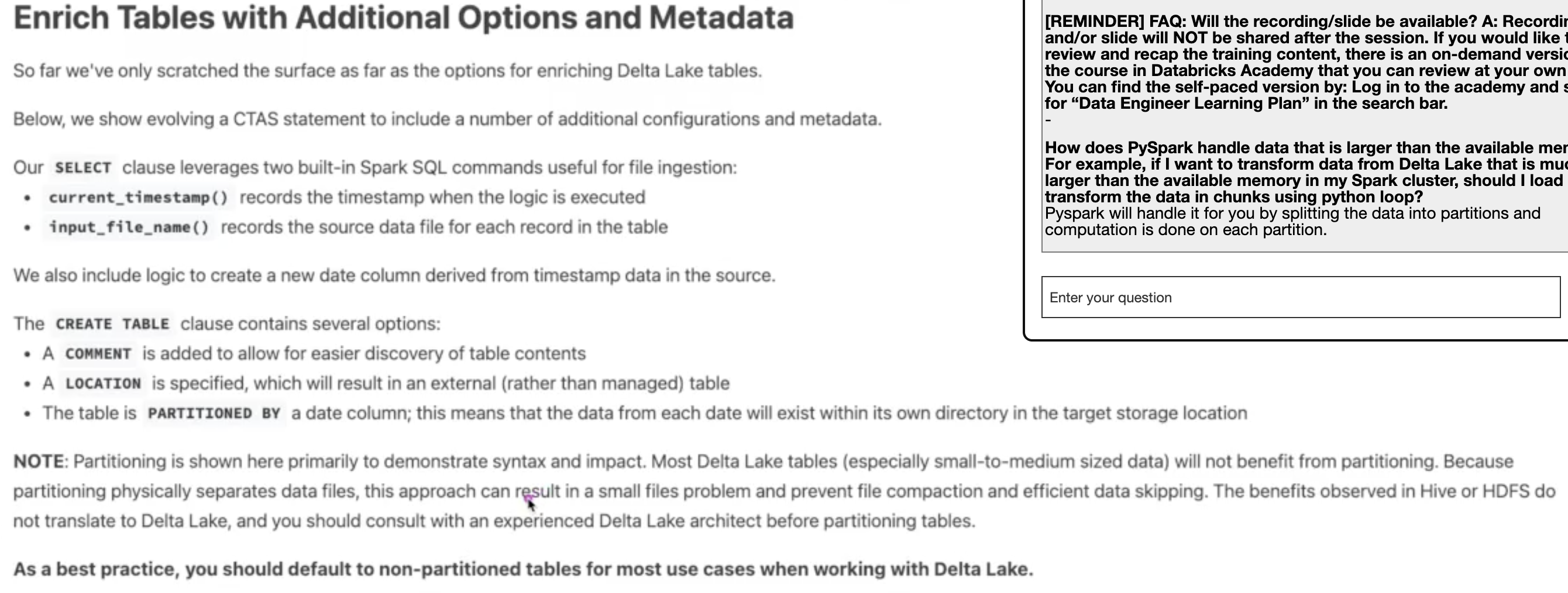
<p>You can enrich your delta table by adding more metadata information
<img alt="alt text" src="/assets/2023-04-18-databricks-webinar/db-webinar-1.png">
- you can use <code>pyspark.sql.functions as F</code> to get the <code>input_file_name</code> or <code>current_timestamp</code> to enrich your table
<img alt="alt text" src="/assets/2023-04-18-databricks-webinar/db-webinar-2.png"></p>
</li>
<li>
<p><strong><strong>AS A BEST PRACTICE, DONT USE PARTITIONING IN DELTALAKE IF THE TABLE IS SMALL</strong></strong></p>
</li>
<li>
<p>You can use <strong><strong>DEEP</strong></strong> or <strong><strong>SHALLOW</strong></strong> clone of delta table source to use it for model development or testing.</p>
</li>
<li>
<p>Avoid to use Spark RDD, just use the higher level API because it is included Query optimization</p>
</li>
<li>
<p>You can use <code>sparkdf.schema</code> to get the schema and use the schema to create another table</p>
</li>
<li>
<p><code>df.collect</code> get all data from all executor to driver</p>
</li>
<li>
<p>you can use <code>df.creteaOrReplaceTempView</code> to use a sql spark API which create temporary table in memory</p>
</li>
<li>
<p>Spark dataframe is <strong><strong>immutable</strong></strong></p>
</li>
<li>
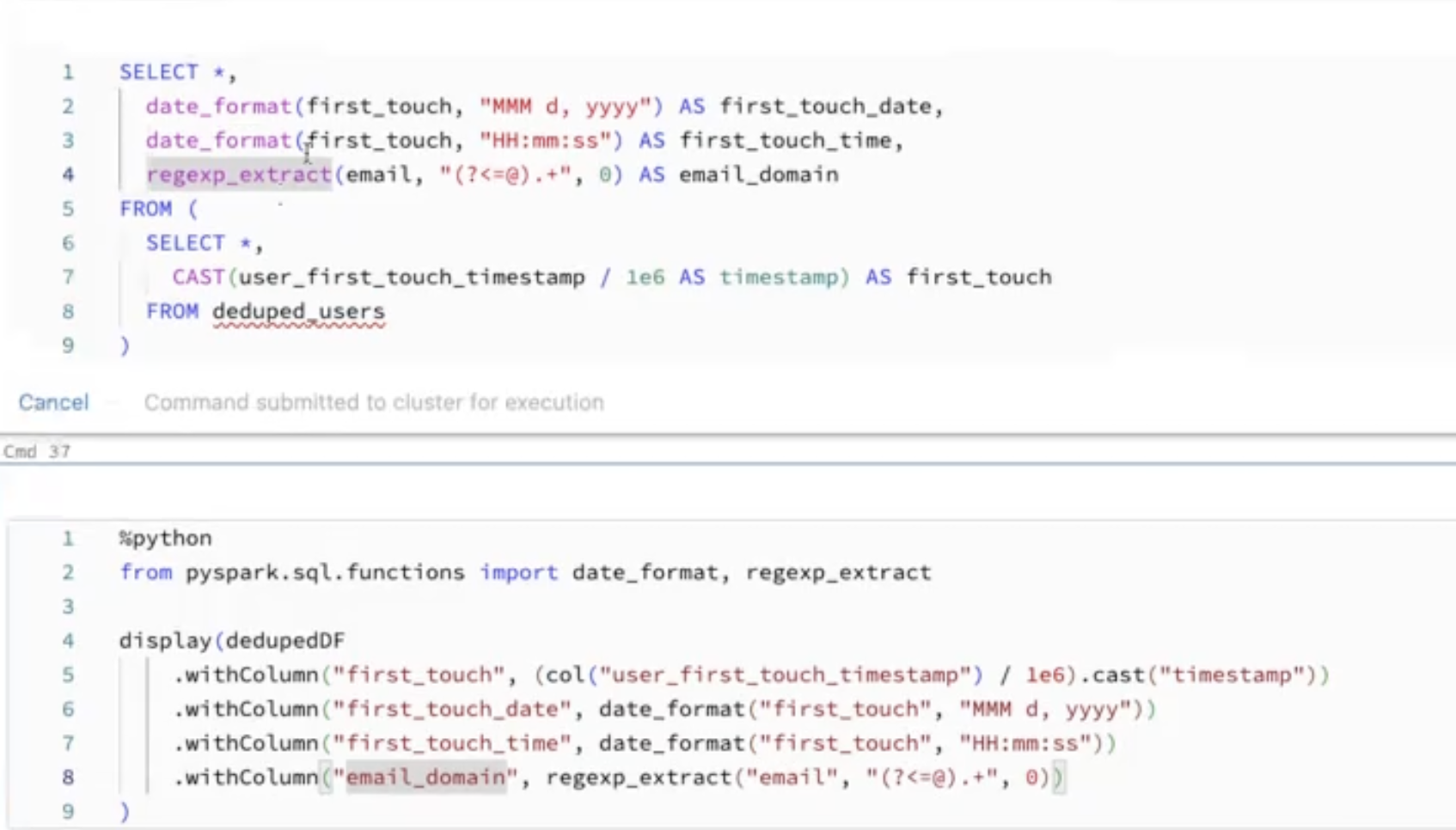
<p><code>count(*)</code> count null value, use <code>count(colname)</code> to skipped null value
- conver from timestamp to date format
<img alt="alt text" src="/assets/2023-04-18-databricks-webinar/db-webinar-3.png"></p>
</li>
<li>
<p>you can use <code>.</code>to access nested data</p>
</li>
<li>
<p>infer all table or dataframe to pyspark native schema</p>
</li>
<li>
<p>The reason why many spark schema use struct to reduce the memory usage, if you want to explode consider to select only needed column. <strong><strong>explode dataframe is expensive!</strong></strong></p>
</li>
</ul>
</section>
<section id="Day-3-20230419">

<h3><a href="#Day-3-20230419">Day 3 (20230419)</a></h3>
<ul>
<li>
<p>Incremental data ingestion with <strong><strong>Auto Loader</strong></strong></p>
</li>
<li>
<p>To enable schema evolution for future need, you need you track the schema evolution (ref: deltalake schema evolution format)</p>
</li>
<li>
<p>In order to avoid data throw due to unmatched schema or data type you can create a column called <code>_rescued_data</code> (check how to use)</p>
</li>
<li>
<p>schema_hints</p>
</li>
<li>
<p>checkpoint is really importance in structure streaming</p>
</li>
<li>
<p>Streaming should be
- High available
- Reply-able
- Durable
- Idemponent</p>
</li>
<li>
<p>You can view the streaming dataframe in streaming manner using <code>readStream(...).createOrReplaceTempView()</code>. the you can check or applied the data transformation using spark sql API. Then you can write it back using <code>spark.table("tempViewname").writeStream(...)</code> (see. DL 6.3L)</p>

<figure class="code-block">


<pre><code><span class="line"> (spark.readStream</span>
<span class="line">     .table(<span class="hl-string">&quot;bronze&quot;</span>)</span>
<span class="line">     .createOrReplaceTempView(<span class="hl-string">&quot;streaming_tmp_vw&quot;</span>))</span>
<span class="line"> </span>
<span class="line"> %sql</span>
<span class="line"> SELECT * FROM streaming_tmp_vw</span>
<span class="line"> </span>
<span class="line"> <span class="hl-keyword">for</span> s <span class="hl-keyword">in</span> spark.streams.active:</span>
<span class="line">     <span class="hl-built_in">print</span>(<span class="hl-string">&quot;Stopping &quot;</span> + s.<span class="hl-built_in">id</span>)</span>
<span class="line">     s.stop()</span>
<span class="line">     s.awaitTermination()</span>
<span class="line"> </span>
<span class="line"> <span class="hl-comment"># operation</span></span>
<span class="line"> %sql </span>
<span class="line"> SELECT device_id, count(device_id) AS total_recordings</span>
<span class="line"> FROM streaming_tmp_vw</span>
<span class="line"> GROUP BY device_id</span></code></pre>

</figure>
</li>
<li>
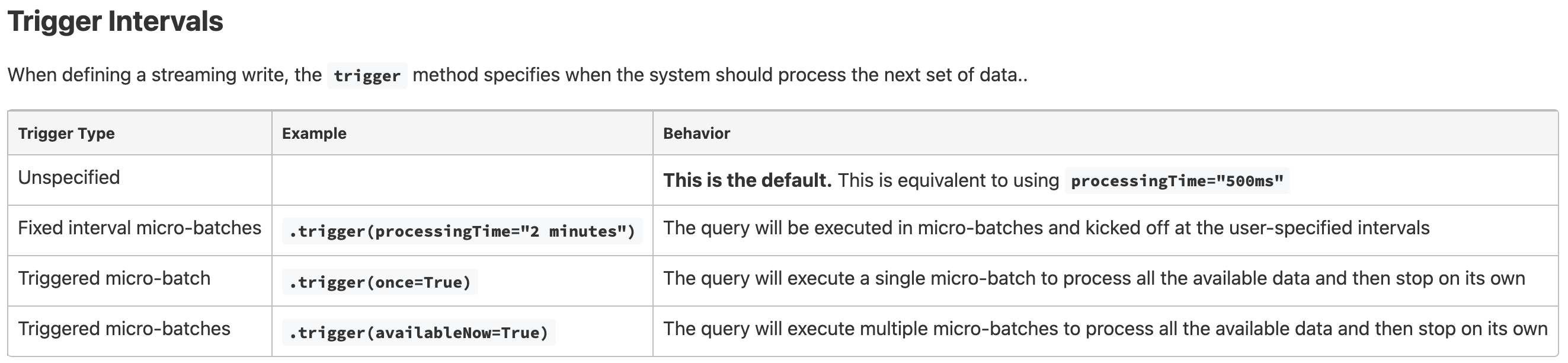
<p>Streaming <code>trigger(availableNow)</code></p>
</li>
<li>
<p>Streaming <code>trigger("once")</code> is useful to run the program once you need. Because it store the checkpoint, so next time it run, it will get the data from the last checkpoint. But its recommended to use <code>trigger("availableNow")</code>.
<img alt="alt text" src="/assets/2023-04-18-databricks-webinar/db-webinar-4.png"></p>
</li>
</ul>
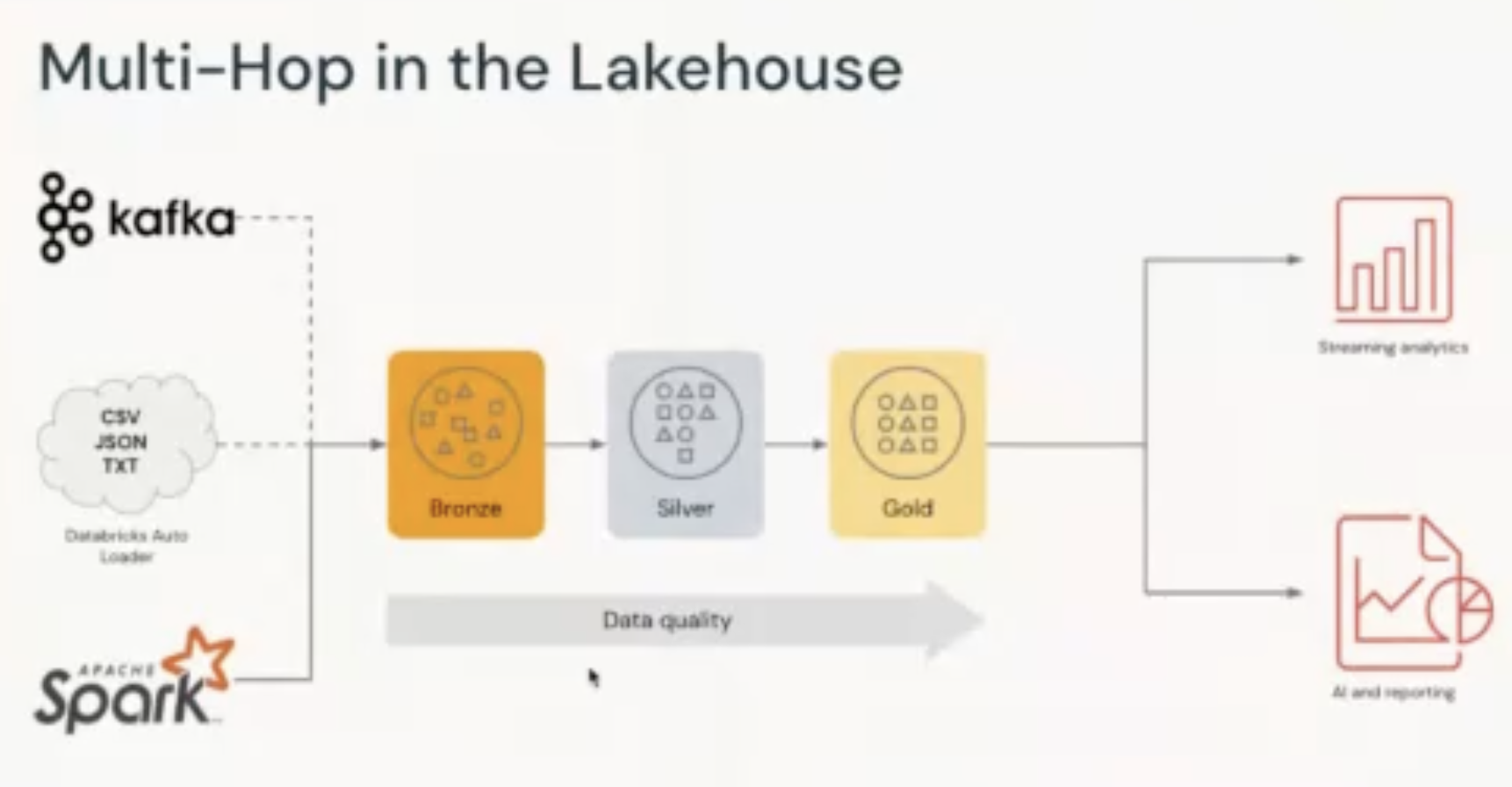
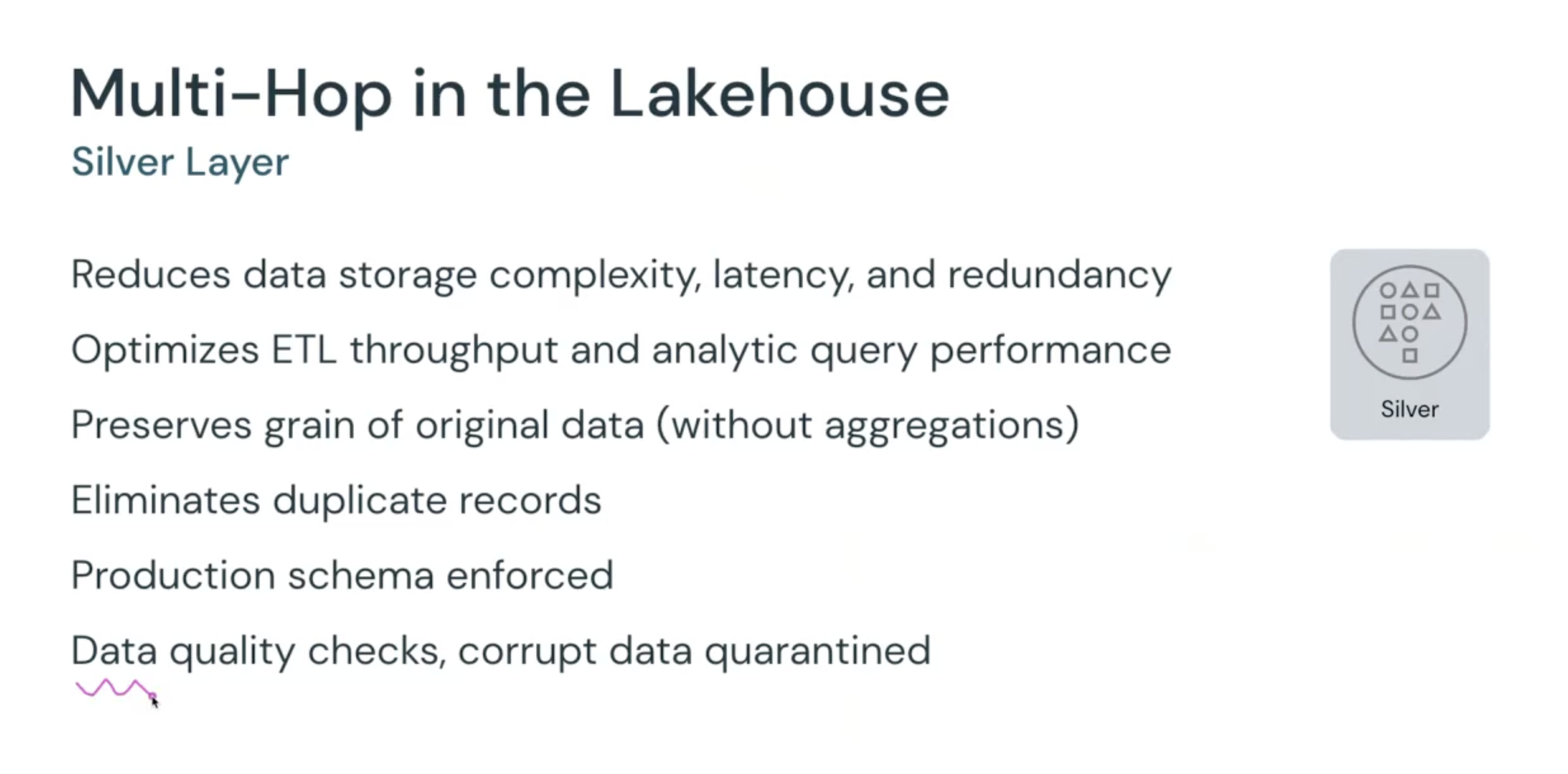
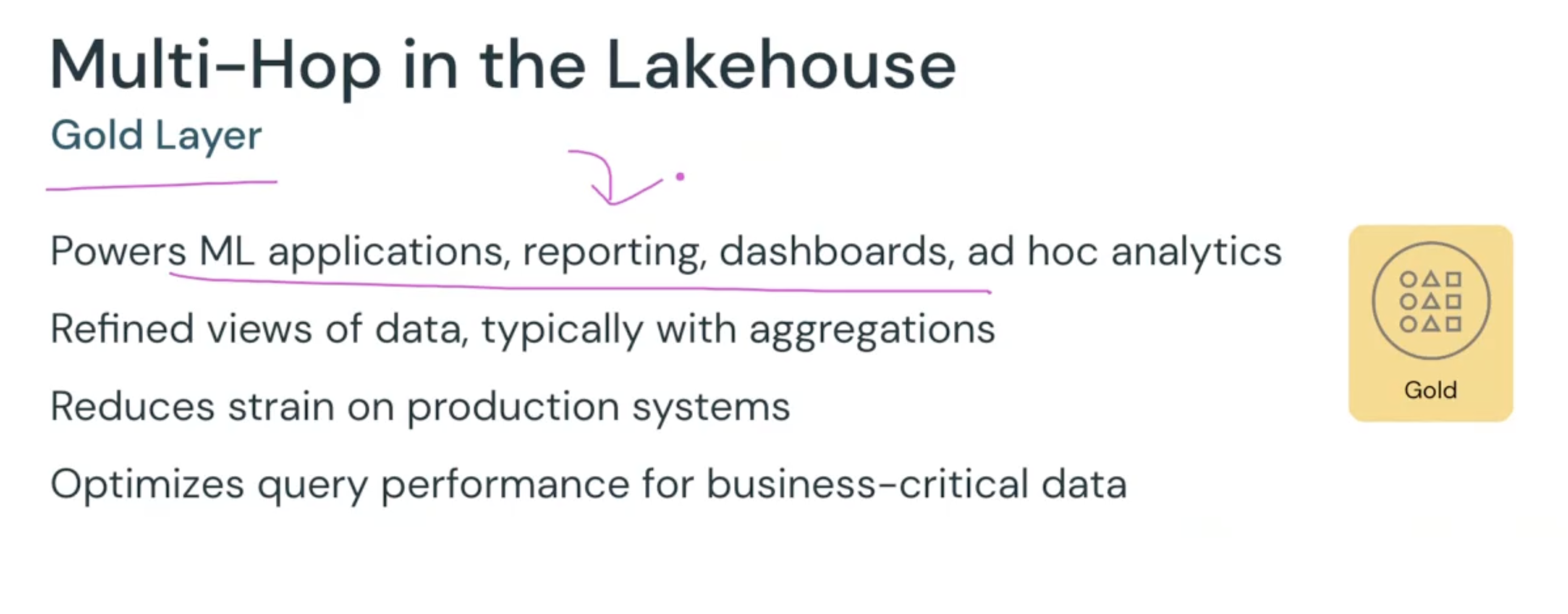
<p><strong><strong>MULTI-HOP Architecture</strong></strong></p>
<p><img alt="alt text" src="/assets/2023-04-18-databricks-webinar/db-webinar-5.png">
<img alt="alt text" src="/assets/2023-04-18-databricks-webinar/db-webinar-6.png">
<img alt="alt text" src="/assets/2023-04-18-databricks-webinar/db-webinar-7.png"></p>
</section>
]]>
    </content>
  </entry>
  <entry>
    <title type="text">How to Test/Debug Spark Streaming</title>
    <link
      href="https://hattajr.github.io/2022/04/30/how-to-debug-spark-streaming.html"
      rel="alternate"
      type="text/html"
      title="How to Test/Debug Spark Streaming"
    />
    <published>2022-04-30T00:00:00+00:00</published>
    <updated>2022-04-30T00:00:00+00:00</updated>
    <id>https://hattajr.github.io/2022/04/30/how-to-debug-spark-streaming</id>
    <author><name>Muhammad Hatta</name></author>
    <summary type="html"><![CDATA[undefined]]></summary>
    <content
      type="html"
      xml:base="https://hattajr.github.io/2022/04/30/how-to-debug-spark-streaming.html"
    >
      <![CDATA[
<header>
  <h1>How to Test/Debug Spark Streaming</h1>
  <time class="meta" datetime="2022-04-30">Apr 30, 2022</time>
</header>

<figure class="code-block">


<pre><code><span class="line"><span class="hl-keyword">import</span> time</span>
<span class="line"></span>
<span class="line"><span class="hl-keyword">def</span> <span class="hl-title function_">batch_function</span>(<span class="hl-params">cdf_df: DataFrame, batch_id</span>):</span>
<span class="line">    _<span class="hl-built_in">print</span>(cdf_df.count())</span>
<span class="line"></span>
<span class="line">query = (</span>
<span class="line">    spark.readStream</span>
<span class="line">    .<span class="hl-built_in">format</span>(<span class="hl-string">&quot;delta&quot;</span>)</span>
<span class="line">    .options(readChangeFeed=<span class="hl-string">&quot;true&quot;</span>, maxBytesPerTrigger=<span class="hl-string">&quot;1K&quot;</span>)</span>
<span class="line">    .table(<span class="hl-string">&quot;_temp_max_bytes_calc&quot;</span>)</span>
<span class="line">    .select(<span class="hl-string">&quot;id&quot;</span>, <span class="hl-string">&quot;year&quot;</span>, <span class="hl-string">&quot;month&quot;</span>)</span>
<span class="line">    .drop_duplicates()</span>
<span class="line">    .writeStream</span>
<span class="line">    .foreachBatch(batch_function)</span>
<span class="line">    .trigger(processingTime=<span class="hl-string">&quot;5 seconds&quot;</span>)</span>
<span class="line">    .queryName(<span class="hl-string">&quot;my query&quot;</span>)</span>
<span class="line">    .start()</span>
<span class="line">)</span>
<span class="line"></span>
<span class="line">time.sleep(<span class="hl-number">5</span>)</span>
<span class="line"><span class="hl-keyword">while</span> query.isActive:</span>
<span class="line">    stop_conditions = [</span>
<span class="line">        <span class="hl-keyword">not</span> query.status[<span class="hl-string">&quot;isDataAvailable&quot;</span>],</span>
<span class="line">        <span class="hl-keyword">not</span> query.status[<span class="hl-string">&quot;isTriggerActive&quot;</span>],</span>
<span class="line">        query.status[<span class="hl-string">&quot;message&quot;</span>] != <span class="hl-string">&quot;Initializing sources&quot;</span>, ]</span>
<span class="line"></span>
<span class="line">    <span class="hl-keyword">if</span> <span class="hl-built_in">all</span>(stop_conditions):</span>
<span class="line">        query.stop()</span>
<span class="line"></span>
<span class="line">    time.sleep(<span class="hl-number">1</span>)</span>
<span class="line"></span>
<span class="line">query.awaitTermination(<span class="hl-number">10</span>)</span></code></pre>

</figure>
]]>
    </content>
  </entry>
  <entry>
    <title type="text">Software Development Quality</title>
    <link
      href="https://hattajr.github.io/2022/04/09/software-development-quality.html"
      rel="alternate"
      type="text/html"
      title="Software Development Quality"
    />
    <published>2022-04-09T00:00:00+00:00</published>
    <updated>2022-04-09T00:00:00+00:00</updated>
    <id>https://hattajr.github.io/2022/04/09/software-development-quality</id>
    <author><name>Muhammad Hatta</name></author>
    <summary type="html"><![CDATA[undefined]]></summary>
    <content
      type="html"
      xml:base="https://hattajr.github.io/2022/04/09/software-development-quality.html"
    >
      <![CDATA[
<header>
  <h1>Software Development Quality</h1>
  <time class="meta" datetime="2022-04-09">Apr 9, 2022</time>
</header>

<figure>

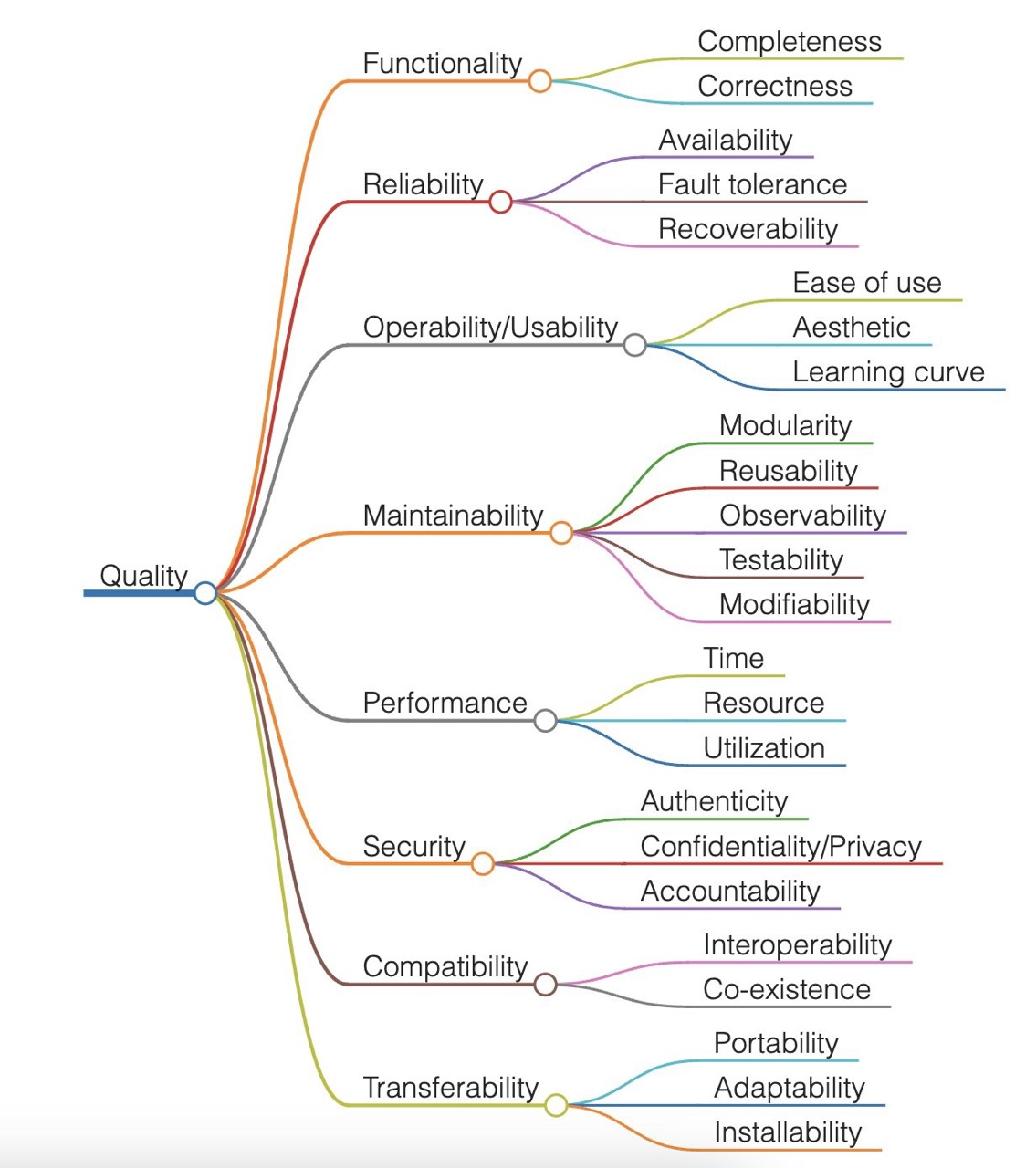
<img alt="alt text" src="/assets/2022-04-09-software-development-quality/sw-priority.png">
</figure>
]]>
    </content>
  </entry>
  <entry>
    <title type="text">Apache Spark Configuration Experiences</title>
    <link
      href="https://hattajr.github.io/2021/08/05/spark-configuration-experiences.html"
      rel="alternate"
      type="text/html"
      title="Apache Spark Configuration Experiences"
    />
    <published>2021-08-05T00:00:00+00:00</published>
    <updated>2021-08-05T00:00:00+00:00</updated>
    <id>https://hattajr.github.io/2021/08/05/spark-configuration-experiences</id>
    <author><name>Muhammad Hatta</name></author>
    <summary type="html">
      <![CDATA[Some important spark configuration]]>
    </summary>
    <content
      type="html"
      xml:base="https://hattajr.github.io/2021/08/05/spark-configuration-experiences.html"
    >
      <![CDATA[
<header>
  <h1>Apache Spark Configuration Experiences</h1>
  <time class="meta" datetime="2021-08-05">Aug 5, 2021</time>
</header>
<ul>
<li>
<p>Some important spark configuration</p>

<figure class="code-block">


<pre><code><span class="line">--conf spark.driver.memory=90g \</span>
<span class="line">--conf spark.sql.files.maxPartitionBytes=<span class="hl-number">4194304</span> \</span>
<span class="line">--conf spark.eventLog.enabled=true \</span>
<span class="line">--conf spark.eventLog.<span class="hl-built_in">dir</span>=/opt/airflow/dags/spark-events</span></code></pre>

</figure>
</li>
<li>
<p>Partition configuration
- Input partition
- control the <strong><strong>input partition</strong></strong> by using <code>spark.sql.files.maxPartitionBytes</code>
- default is 128mb, but if you will have explode operation, consider to decrease this value
- control the <strong><strong>shuffle partition</strong></strong> by using <code>spark.sql.shuffle.partitions</code>
- default is 200 partition, but if you will have explode operation, consider to decrease this value
- control the <strong><strong>output partition</strong></strong> by using <code>.option("maxRecordsPerFile", "x")</code></p>
</li>
<li>
<p>Estimate the number of partition</p>

<figure class="code-block">


<pre><code><span class="line"><span class="hl-keyword">import</span> numpy <span class="hl-keyword">as</span> np</span>
<span class="line"></span>
<span class="line"><span class="hl-built_in">print</span> (<span class="hl-string">&quot;\n\n*********************************************************************************&quot;</span>)</span>
<span class="line"></span>
<span class="line"><span class="hl-string">&quot;&quot;&quot;</span></span>
<span class="line"><span class="hl-string">IF THE SHUFLLE PARTITION IS NOT CHANGE IN THE SPARK UI, PLEASE CHECK THE FOLLOWING:</span></span>
<span class="line"><span class="hl-string">- REMOVE THE TABLE IN MINIO UNDER THE SAME NAME OF THE RUNNING SPARK APP</span></span>
<span class="line"><span class="hl-string">&quot;&quot;&quot;</span></span>
<span class="line">CONS_SHUFFLE_RATIO_ROWS = <span class="hl-number">1</span>/<span class="hl-number">21</span></span>
<span class="line">CONST_MB_TO_BYTES = <span class="hl-number">1024</span> * <span class="hl-number">1024</span></span>
<span class="line"></span>
<span class="line">total_num_rows = <span class="hl-number">5932823</span> &lt;- you only need this <span class="hl-keyword">as</span> <span class="hl-built_in">input</span></span>
<span class="line"></span>
<span class="line">seed_no = <span class="hl-number">123</span></span>
<span class="line">num_cores = <span class="hl-built_in">int</span>(<span class="hl-number">32</span>)</span>
<span class="line">total_available_memory_gb= <span class="hl-number">125</span></span>
<span class="line">reserved_memory_gb = <span class="hl-number">35</span></span>
<span class="line"></span>
<span class="line">target_input_max_bytes_per_file_mb = <span class="hl-number">4</span></span>
<span class="line">target_input_max_bytes_per_file_bytes = target_input_max_bytes_per_file_mb * CONST_MB_TO_BYTES</span>
<span class="line"></span>
<span class="line">max_records_per_file = <span class="hl-number">1_000</span></span>
<span class="line"></span>
<span class="line">num_shuffle_partitions = <span class="hl-built_in">int</span>(np.ceil(total_num_rows * CONS_SHUFFLE_RATIO_ROWS))</span>
<span class="line"></span>
<span class="line"><span class="hl-built_in">print</span>(<span class="hl-string">f&quot;<span class="hl-subst">{<span class="hl-string">&#x27;SEED NO&#x27;</span>:&lt;<span class="hl-number">30</span>}</span> : <span class="hl-subst">{seed_no}</span>&quot;</span>)</span>
<span class="line"><span class="hl-built_in">print</span>(<span class="hl-string">f&quot;<span class="hl-subst">{<span class="hl-string">&#x27;NUM CORES&#x27;</span>:&lt;<span class="hl-number">30</span>}</span> : <span class="hl-subst">{num_cores}</span>&quot;</span>)</span>
<span class="line"><span class="hl-built_in">print</span>(<span class="hl-string">f&quot;<span class="hl-subst">{<span class="hl-string">&#x27;TOTAL MEMORY DRIVER&#x27;</span>:&lt;<span class="hl-number">30</span>}</span> : <span class="hl-subst">{total_available_memory_gb-reserved_memory_gb}</span> gb&quot;</span>)</span>
<span class="line"><span class="hl-built_in">print</span> (<span class="hl-string">f&quot;<span class="hl-subst">{<span class="hl-string">&#x27;MEMORY PER CORE&#x27;</span>:&lt;<span class="hl-number">30</span>}</span> : <span class="hl-subst">{(total_available_memory_gb - reserved_memory_gb)/num_cores}</span> gb&quot;</span>)</span>
<span class="line"></span>
<span class="line"><span class="hl-built_in">print</span>(<span class="hl-string">f&quot;<span class="hl-subst">{<span class="hl-string">&#x27;MAX INPUT SIZE&#x27;</span>:&lt;<span class="hl-number">30</span>}</span> : <span class="hl-subst">{target_input_max_bytes_per_file_mb}</span> mb / <span class="hl-subst">{target_input_max_bytes_per_file_bytes}</span> bytes&quot;</span>)</span>
<span class="line"><span class="hl-built_in">print</span> (<span class="hl-string">f&quot;<span class="hl-subst">{<span class="hl-string">&#x27;SHUFFLE PARTITION&#x27;</span>:&lt;<span class="hl-number">30</span>}</span> : <span class="hl-subst">{num_shuffle_partitions}</span> partitions&quot;</span>)</span>
<span class="line"><span class="hl-built_in">print</span> (<span class="hl-string">f&quot;<span class="hl-subst">{<span class="hl-string">&#x27;MAX RECORDS PER FILE&#x27;</span>:&lt;<span class="hl-number">30</span>}</span> : <span class="hl-subst">{max_records_per_file}</span> records&quot;</span>)</span>
<span class="line"><span class="hl-built_in">print</span> (<span class="hl-string">&quot;*********************************************************************************\n\n&quot;</span>)</span></code></pre>

</figure>
</li>
</ul>
]]>
    </content>
  </entry>
  <entry>
    <title type="text">Setup Hadoop Cluster</title>
    <link
      href="https://hattajr.github.io/2021/07/08/setup-hadoop-cluster.html"
      rel="alternate"
      type="text/html"
      title="Setup Hadoop Cluster"
    />
    <published>2021-07-08T00:00:00+00:00</published>
    <updated>2021-07-08T00:00:00+00:00</updated>
    <id>https://hattajr.github.io/2021/07/08/setup-hadoop-cluster</id>
    <author><name>Muhammad Hatta</name></author>
    <summary type="html">
      <![CDATA[make a new useradd for hadoop master useradd -m its]]>
    </summary>
    <content
      type="html"
      xml:base="https://hattajr.github.io/2021/07/08/setup-hadoop-cluster.html"
    >
      <![CDATA[
<header>
  <h1>Setup Hadoop Cluster</h1>
  <time class="meta" datetime="2021-07-08">Jul 8, 2021</time>
</header>
<ol>
<li>
<p>make a new useradd for hadoop master <code>useradd -m its</code></p>
</li>
<li>
<p>give the root access using visudo <code>its ALL=(ALL:ALL) ALL</code></p>
</li>
<li>
<p>change the hostname using <code>sudo hostname &lt;hadoop-master&gt;</code></p>
<p><a href="https://www.redhat.com/sysadmin/change-hostname-linux" class="url">https://www.redhat.com/sysadmin/change-hostname-linux</a></p>
</li>
<li>
<p>download <a href="https://download.java.net/openjdk/jdk8u41/ri/openjdk-8u41-b04-linux-x64-14_jan_2020.tar.gz">openjdk 8</a> or 11 and extract the tar</p>
<ul>
<li>
jdk download link
- <a href="https://www.oracle.com/java/technologies/downloads/" class="url">https://www.oracle.com/java/technologies/downloads/</a>
- <a href="https://jdk.java.net/archive/" class="url">https://jdk.java.net/archive/</a>
</li>
</ul>
</li>
<li>
<p>Move extracted folder to <code>usr/local/</code> or <code>/opt/</code> so everybody can access java</p>
</li>
<li>
<p>add env variable and put in bashr also add path</p>

<figure class="code-block">


<pre><code><span class="line"><span class="hl-built_in">export</span> JAVA_HOME=/usr/local/jdk-18.0.1.1</span>
<span class="line"><span class="hl-built_in">export</span> PATH=<span class="hl-variable">$PATH</span>:<span class="hl-variable">$JAVA_HOME</span>/bin</span></code></pre>

</figure>
</li>
<li>
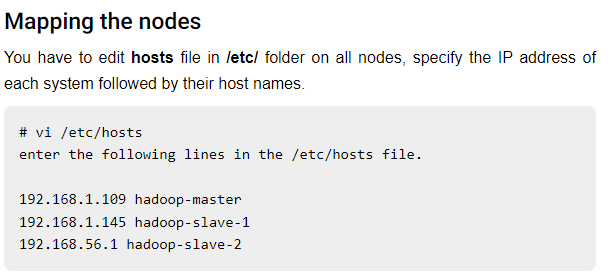
<p>mapping nodes</p>

<figure>

<img alt="alt text" src="/assets/2021-07-08-setup-hadoop-cluster/hadoop-mapping-nodes.png">
</figure>
</li>
<li>
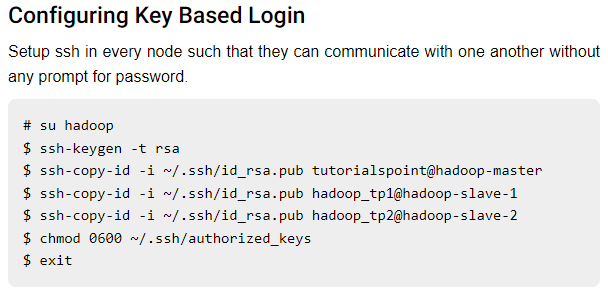
<p>configuring ssh key to all slave</p>

<figure>

<img alt="alt text" src="/assets/2021-07-08-setup-hadoop-cluster/hadoop-ssh-key.png">
</figure>
</li>
<li>
<p>download and install hadoop (untar using <code>tar -xzf &lt;.gz.tar file&gt;</code></p>
<ul>
<li>
hadoop mirror link: <a href="https://dlcdn.apache.org/hadoop/common/" class="url">https://dlcdn.apache.org/hadoop/common/</a>
</li>
</ul>
</li>
<li>
<p>configure hadoop</p>
<ul>
<li>
hadoop .xml file can be found in <code>hadoop/etc/hadoop/</code>
</li>
</ul>

<figure>

<img alt="alt text" src="/assets/2021-07-08-setup-hadoop-cluster/hadoop-config-1.png">
</figure>

<figure>

<img alt="alt text" src="/assets/2021-07-08-setup-hadoop-cluster/hadoop-config-2.png">
</figure>

<figure>

<img alt="alt text" src="/assets/2021-07-08-setup-hadoop-cluster/hadoop-config-3.png">
</figure>
</li>
<li>
<p>permission problem and copy hadoop to another node</p>
<ul>
<li>
in order to resyn, you need to mkdir hadoop in slave node with <code>chown -R its hadoop</code>
</li>
</ul>
<p><code>sudo chmod -R 777 opt</code></p>
<p><code>rsync -avzhP /opt/hadoop/hadoop-3.3.3 hadoop-slave-01@host:/opt/hadoop</code></p>
</li>
</ol>
<section id="Important-Notes">

<h2><a href="#Important-Notes">Important Notes</a></h2>
<ul>
<li>
<p>don’t forget to set up uniform <code>/etc/host</code> for master and all nodes</p>
</li>
<li>
<p>to format or restart Hadoop make sure you use <code>bin/hdfs namenode -format</code></p>
</li>
<li>
<p>every restart make sure to remove <code>dfs</code> directory</p>
</li>
<li>
<p>the <code>hadoop/etc/hadoop/worker</code> in all nodes shoud be <code>hostname</code> don’t use <code>localhost</code></p>
</li>
<li>
<p>check dir <code>chown</code> or <code>chmod</code></p>
</li>
<li>
<p>without avro 16mins → 6.5mb</p>
</li>
<li>
<p>check hadoop directory <code>bin/hdfs dfs -ls /</code></p>
</li>
<li>
<p>if the hadoop:9000 is not in <code>nestat</code> please check the <code>dfs</code> dir. hadoop:9000 only working if the <code>dfs</code> dir is available (this behavior usually happens when you remove the <code>dfs</code> after <code>bin/hdfs namenode -format</code> command is executed).</p>
</li>
<li>
<p>if one server/datanode is down, use <code>hdfs --daemon start datanode</code> in the node.</p>
</li>
<li>
<p>ensure pyarrow installation</p>
</li>
<li>
<p>if error below, check another version of JDK</p>

<figure class="code-block">


<pre><code><span class="line">ERROR Cannot <span class="hl-built_in">set</span> priority of resourcemanager process at &lt;&gt;</span></code></pre>

</figure>
</li>
<li>
<p>when the datanode is not detected or the datanode is now shown in web UI, please remove the dfs directory in that datanode and stop, format, start again</p>
</li>
<li>
<p>if error below happen → in hadoop master node make a dir <code>bin/hdfs dfs -mkdir /raw</code> and <code>bin/hdfs dfs -chmod -R 777 /raw</code></p>

<figure class="code-block">


<pre><code><span class="line">Caused by: org.apache.hadoop.ipc.RemoteException(org.apache.hadoop.security.AccessControlException): Permission denied: user=root, access=WRITE, inode=<span class="hl-string">&quot;/raw&quot;</span>:its:supergroup:drwxrwxr-x</span></code></pre>

</figure>
</li>
<li>
<p>if error below happen → in the client set the env variable <code>export HADOOP_USER_NAME=&lt;username at master&gt;</code></p>

<figure class="code-block">


<pre><code><span class="line">22/07/26 03:41:44 ERROR MicroBatchExecution: Query [<span class="hl-built_in">id</span> = 81b7eb6c-a753-4f69-904e-6ed1af5e0721, runId = a9b235df-e53a-4ef6-a02d-b22b9f8fbd2d] terminated with error</span>
<span class="line">org.apache.hadoop.security.AccessControlException: Permission denied: user=root, access=WRITE, inode=<span class="hl-string">&quot;/&quot;</span>:its:supergroup:drwxr-xr-x</span>
<span class="line"></span>
<span class="line">Caused by: org.apache.hadoop.ipc.RemoteException(org.apache.hadoop.security.AccessControlException): Permission denied: user=root, access=WRITE, inode=<span class="hl-string">&quot;/&quot;</span>:its:supergroup:drwxr-xr-x</span></code></pre>

</figure>
</li>
</ul>
</section>
<section id="References">

<h2><a href="#References">References</a></h2>
<p><a href="https://www.tutorialspoint.com/hadoop/hadoop_multi_node_cluster.htm" class="url">https://www.tutorialspoint.com/hadoop/hadoop_multi_node_cluster.htm</a></p>
<p><a href="https://dlcdn.apache.org/hadoop/common/" class="url">https://dlcdn.apache.org/hadoop/common/</a></p>
<section id="hdfs-site-xml">

<h3><a href="#hdfs-site-xml">hdfs-site-xml</a></h3>

<figure class="code-block">


<pre><code><span class="line"><span class="hl-tag">&lt;<span class="hl-name">configuration</span>&gt;</span></span>
<span class="line"><span class="hl-tag">&lt;<span class="hl-name">property</span>&gt;</span></span>
<span class="line"><span class="hl-tag">&lt;<span class="hl-name">name</span>&gt;</span>dfs.datanode.data.dir<span class="hl-tag">&lt;/<span class="hl-name">name</span>&gt;</span></span>
<span class="line"><span class="hl-tag">&lt;<span class="hl-name">value</span>&gt;</span>/opt/hadoop/hadoop/dfs/name/data<span class="hl-tag">&lt;/<span class="hl-name">value</span>&gt;</span></span>
<span class="line"><span class="hl-tag">&lt;<span class="hl-name">final</span>&gt;</span>true<span class="hl-tag">&lt;/<span class="hl-name">final</span>&gt;</span></span>
<span class="line"><span class="hl-tag">&lt;/<span class="hl-name">property</span>&gt;</span></span>
<span class="line"></span>
<span class="line"><span class="hl-tag">&lt;<span class="hl-name">property</span>&gt;</span></span>
<span class="line"><span class="hl-tag">&lt;<span class="hl-name">name</span>&gt;</span>dfs.name.dir<span class="hl-tag">&lt;/<span class="hl-name">name</span>&gt;</span></span>
<span class="line"><span class="hl-tag">&lt;<span class="hl-name">value</span>&gt;</span>/opt/hadoop/hadoop/dfs/name<span class="hl-tag">&lt;/<span class="hl-name">value</span>&gt;</span></span>
<span class="line"><span class="hl-tag">&lt;<span class="hl-name">final</span>&gt;</span>true<span class="hl-tag">&lt;/<span class="hl-name">final</span>&gt;</span></span>
<span class="line"><span class="hl-tag">&lt;/<span class="hl-name">property</span>&gt;</span></span>
<span class="line"></span>
<span class="line"><span class="hl-tag">&lt;<span class="hl-name">property</span>&gt;</span></span>
<span class="line">    <span class="hl-tag">&lt;<span class="hl-name">name</span>&gt;</span>dfs.permissions<span class="hl-tag">&lt;/<span class="hl-name">name</span>&gt;</span></span>
<span class="line">    <span class="hl-tag">&lt;<span class="hl-name">value</span>&gt;</span>false<span class="hl-tag">&lt;/<span class="hl-name">value</span>&gt;</span></span>
<span class="line"><span class="hl-tag">&lt;/<span class="hl-name">property</span>&gt;</span></span>
<span class="line"></span>
<span class="line"><span class="hl-tag">&lt;<span class="hl-name">property</span>&gt;</span></span>
<span class="line"><span class="hl-tag">&lt;<span class="hl-name">name</span>&gt;</span>dfs.replication<span class="hl-tag">&lt;/<span class="hl-name">name</span>&gt;</span></span>
<span class="line"><span class="hl-tag">&lt;<span class="hl-name">value</span>&gt;</span>1<span class="hl-tag">&lt;/<span class="hl-name">value</span>&gt;</span></span>
<span class="line"><span class="hl-tag">&lt;/<span class="hl-name">property</span>&gt;</span></span>
<span class="line"><span class="hl-tag">&lt;/<span class="hl-name">configuration</span>&gt;</span></span></code></pre>

</figure>
</section>
</section>
]]>
    </content>
  </entry>
  <entry>
    <title type="text">Integrate TMUX into VSCODE Terminal</title>
    <link
      href="https://hattajr.github.io/2021/07/02/tmux-vscode-integration.html"
      rel="alternate"
      type="text/html"
      title="Integrate TMUX into VSCODE Terminal"
    />
    <published>2021-07-02T00:00:00+00:00</published>
    <updated>2021-07-02T00:00:00+00:00</updated>
    <id>https://hattajr.github.io/2021/07/02/tmux-vscode-integration</id>
    <author><name>Muhammad Hatta</name></author>
    <summary type="html">
      <![CDATA[Put the settings below into .vscode/settings.json json
{
"terminal.integrated.profiles.linux": {
//...existing profiles...
"tmux": {
"path": "tmux",
"args": ["attach-session", "-d", "-t", "<host>:${workspaceFolderBasename}"]
},
}, 
"terminal.integrated.defaultProfile.linux": "tmux",
"terminal.integrated.fontSize": 11
}
]]>
    </summary>
    <content
      type="html"
      xml:base="https://hattajr.github.io/2021/07/02/tmux-vscode-integration.html"
    >
      <![CDATA[
<header>
  <h1>Integrate TMUX into VSCODE Terminal</h1>
  <time class="meta" datetime="2021-07-02">Jul 2, 2021</time>
</header>
<p>Put the settings below into <code>.vscode/settings.json</code>
<code>json
{
"terminal.integrated.profiles.linux": {
//...existing profiles...
"tmux": {
"path": "tmux",
"args": ["attach-session", "-d", "-t", "&lt;host&gt;:${workspaceFolderBasename}"]
},
}, 
"terminal.integrated.defaultProfile.linux": "tmux",
"terminal.integrated.fontSize": 11
}
</code></p>
]]>
    </content>
  </entry>
  <entry>
    <title type="text">TDD Rules</title>
    <link
      href="https://hattajr.github.io/2021/05/19/tdd-review.html"
      rel="alternate"
      type="text/html"
      title="TDD Rules"
    />
    <published>2021-05-19T00:00:00+00:00</published>
    <updated>2021-05-19T00:00:00+00:00</updated>
    <id>https://hattajr.github.io/2021/05/19/tdd-review</id>
    <author><name>Muhammad Hatta</name></author>
    <summary type="html">
      <![CDATA[You are not allowed to write alien production code before writing failing tests.]]>
    </summary>
    <content
      type="html"
      xml:base="https://hattajr.github.io/2021/05/19/tdd-review.html"
    >
      <![CDATA[
<header>
  <h1>TDD Rules</h1>
  <time class="meta" datetime="2021-05-19">May 19, 2021</time>
</header>
<section id="Rules-of-TDD">

<h3><a href="#Rules-of-TDD">Rules of TDD</a></h3>
<ol>
<li>
You are not allowed to write alien production code before writing failing tests.
</li>
<li>
You are not allowed to write more test code than is required to fail.
</li>
<li>
You are not allowed to write more code than is required to pass the failing test.
</li>
</ol>
</section>
]]>
    </content>
  </entry>
  <entry>
    <title type="text">MapReduced explained in 41 Words</title>
    <link
      href="https://hattajr.github.io/2021/03/15/map-reduced-in-41-words.html"
      rel="alternate"
      type="text/html"
      title="MapReduced explained in 41 Words"
    />
    <published>2021-03-15T00:00:00+00:00</published>
    <updated>2021-03-15T00:00:00+00:00</updated>
    <id>https://hattajr.github.io/2021/03/15/map-reduced-in-41-words</id>
    <author><name>Muhammad Hatta</name></author>
    <summary type="html">
      <![CDATA[Goal: Count the number of books in the library.]]>
    </summary>
    <content
      type="html"
      xml:base="https://hattajr.github.io/2021/03/15/map-reduced-in-41-words.html"
    >
      <![CDATA[
<header>
  <h1>MapReduced explained in 41 Words</h1>
  <time class="meta" datetime="2021-03-15">Mar 15, 2021</time>
</header>

<figure class="blockquote">
<blockquote><p><em><strong><strong>Goal</strong></strong>: Count the number of books in the library.</em></p>
<p><strong><strong>Map:</strong></strong> You count up shelf #1, I count up shelf #2. (The more people we get, the faster this part goes.)</p>
<p><strong><strong>Reduce</strong></strong>: We all get together and add up our individual counts.</p>
</blockquote>

</figure>
<p>References: https://www.chrisstucchio.com/blog/2011/mapreduce_explained.html</p>
]]>
    </content>
  </entry>
</feed>